Try our cookies Alza.cz a. s., Company identification number 27082440, uses cookies to ensure the functionality of the website and with your consent also to personalisage the content of our website. By clicking on the “I understand“ button, you agree to the use of cookies and the transfer of data regarding the behavior on the website for displaying targeted advertising on social networks and advertising networks on other websites.
Alzak icon
Catalogue
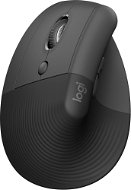
Logitech Lift Left Vertical Ergonomic Mouse Graphite - Mouse

Reviews Logitech Lift Left Vertical Ergonomic Mouse Graphite

Interested in reviews of Logitech Lift Left Vertical Ergonomic Mouse Graphite? It got 4.4 out of 5 stars from our customers. Find specific customer reviews of Logitech Lift Left Vertical Ergonomic Mouse Graphite below. We will appreciate if you also share your experiences with Logitech Lift Left Vertical Ergonomic Mouse Graphite after purchasing.
59.90 €
In stock > 5 pcs
Add to Cart More Information

User Reviews

Václav, Doksyflag
Rated 11/03/2025, variant Logitech Lift Left Vertical Ergonomic Mouse Graphite
Verified purchase
I've been using both of Logitech's left-handed mice - the Signature M650 L Left-Handed and Lift Left - and have run into a big problem with the primary button. Although both mice are designed for left-handed users, each has different default primary and secondary button settings. - Signature M650 L Left-Handed has the right button as primary - Lift Left (vertical mouse) has the left button as primary This would not be a problem if it were possible to set the buttons individually for each mouse. Unfortunately, if you remap the buttons on one mouse in Logi Options+, the other automatically switches the other way, making it impossible to use both at the same time. Plus, macOS doesn't support separate button settings for different mice, which exacerbates the problem. On Windows this could be worked around with third party software, but on macOS there is no easy solution without additional apps. This is a big shortcoming from Logitech - if they make mice for left-handed users, they should have consistent default settings or at least a separate configuration option in Logi Options+. If you only use one mouse, you don't have to worry about it. But if you alternate between classic and vertical mouse (e.g. because of ergonomics), this problem will annoy you every day.
Quality workmanship, ergonomics for left-handed users
Quiet buttons (M650 L), comfortable grip (Lift Left)
Good battery life
Inconsistent default button settings between left-handed models
It is not possible to remap the buttons individually for each mouse in Logi Options+
On macOS, the change is applied to all mice simultaneously
0 ×Report
Automatic translation
Anonymous customerflag
Rated 04/03/2025, variant Logitech Lift Left Vertical Ergonomic Mouse Graphite
Verified purchase
Lightweight, quiet
Battery life
Convenient
One week after the warranty expires, the left button stops working. After reading the discussions, this problem is quite common. I'm sorry.
0 ×Report
Automatic translation
Anonymous customerflag
Rated 11/11/2024, variant Logitech Lift Left Vertical Ergonomic Mouse Graphite
Verified purchase
my hand has to get used to it, but it doesn't bite me anymore
0 ×Report
Automatic translation
D.E.O.K. spol. s r.o., Brnoflag
Rated 30/05/2024, variant Logitech Lift Left Vertical Ergonomic Mouse Graphite
Verified purchase
fits perfectly in the hand
0 ×Report
Automatic translation
Anonymous customerflag
Rated 12/05/2024, variant Logitech Lift Left Vertical Ergonomic Mouse Graphite
Verified purchase
The buttons are HW rotated and even the Logitech Options+ software does not allow adjustment. It's OK for PC. For a laptop where you often use the mouse and touchpad in alternation, it's always the other way around. Even Logitech SW Options + doesn't allow you to set up the Logi LEFT touchpad and mouse separately. Classic mouse - default setting for right-handed users - the main button is left and you click with the index finger of your right hand. I am left-handed, however I use a classic mouse with a right-handed setting. So I click the left button with the middle finger of my left hand. When I use the same Windows settings for this mouse, the primary button is the top one, de facto the right one, and it is clicked with the index finger of the left hand. That's the opposite of what I'm used to. It's just that logitech thinks left-handed people only left click with their index finger. When I set Primary button = Right in Windows, the middle button controls the bottom button, left click. Unfortunately, this switches all mice, and therefore the touchpad on the laptop.
Vertical mouse
For small and medium hands, unfortunately the MX model for large hands is not available in LEFT
The buttons are HW rotated.
the wheel is not tilting
It has 2 user buttons, but they are assigned the same function
0 ×Report
Automatic translation
Otakar, Žatecflag
Rated 11/02/2024, variant Logitech Lift Left Vertical Ergonomic Mouse Graphite
Verified purchase
The perfect left-handed mouse
In Logi you can (among other things) swap buttons (L/R) without affecting the settings of other mice connected to the PC.
Perfect scroll wheel.
Very quiet clicking.
If someone has a REALLY big hand, they better not buy one. I certainly don't have a small hand, but it fits.
0 ×Report
Automatic translation
Vojtěch, Brandýs nad Labemflag
Rated 22/11/2023, variant Logitech Lift Left Vertical Ergonomic Mouse Graphite
Verified purchase
fits well in the hand
the mouse has the main buttons flipped, and you can't change it in their software. As soon as I flip it in Windows, I have all the eg turned over. Touchpad etc.
Completely overpriced and unnecessary. Left-handed mice all seem to have this and it's impossible to work with.
0 ×Report
Automatic translation
Josef, Praha 9 Střížkovflag
Rated 21/10/2023, variant Logitech Lift Left Vertical Ergonomic Mouse Graphite
Verified purchase
smaller, but great !
lousy selection of left-handed mice, on Alza, a real misery .
0 ×Report
Automatic translation
František, Táborflag
Rated 16/09/2023, variant Logitech Lift Left Vertical Ergonomic Mouse Graphite
Verified purchase
I already have the same mouse for my right hand, and now I'm ordering this one so I can alternate. I was pleasantly surprised that the keyboard shortcuts programmed for the right-handed mouse played themselves through the Logi driver to this new left-handed mouse. Another bonus is that I can switch between the left and right buttons in Logi so I don't always have to switch in Windows, I just pick up one of the mice and everything works great. The only disadvantage with a vertical mouse is that it takes some time to get used to moving your hand from the mouse to the keyboard so that your hand doesn't "sweep" the mouse. But that's a matter of days. This of course knocks her to the ground a few times, but the mouse always survives. It takes a lot more time to get used to using your left hand, but it's a great way to prevent carpal tunnel and scoliosis.
0 ×Report
Automatic translation
Robert, Česká Lípaflag
Rated 06/09/2023, variant Logitech Lift Left Vertical Ergonomic Mouse Graphite
Verified purchase
I switched due to wrist pain and the logitech did not disappoint, it helped significantly to relieve from the pain.
The perfect choice for left-handers
I didn't even recognize the transition from a classic mouse to an ergonomic mouse
0 ×Report
Automatic translation
1 - 10 from 11
P-DC1-WEB25

Kunden vertrauen uns Wir haben eine Bewertung von 4,7 von 5 Sternen auf Trustpilot More info »