Try our cookiesAlza.cz a. s., Company identification number 27082440, uses cookies to ensure the functionality of the website and with your consent also to personalisage the content of our website. By clicking on the “I understand“ button, you agree to the use of cookies and the transfer of data regarding the behavior on the website for displaying targeted advertising on social networks and advertising networks on other websites.
We use 8 categories of cookies on our website:
Technical cookies
These are strictly necessary for the functioning of the website and the features you choose to use. Without them, our website would not work; you wouldn't be able to log in to your user account, for example.
Functionality cookies
These cookies allow us to remember your basic choices and improve the user experience. These include remembering your preferred language or allowing you to stay logged in permanently.
Social media cookies
These cookies allow us to easily link you to your social media profile and, for example, allow you to share products and services with your friends and family.
Content personalisation
These cookies allow us to show you content and ads according to the information we have about you to best meet your needs. This includes what content you have viewed, or on what device you are accessing our website.
Non-personalised advertising
These cookies allow us to show you general ads for products and services.
Personalised advertising
Thanks to these cookies, we and our partners can offer you relevant products and services based on your purchases, your shopping behaviour and your preferences.
Audience metrics
These cookies allow us to optimise our site for your convenience based on how you use it. The aim is to remember or anticipate your choices. This includes, for example, the use of features, their location, or the behaviour on the page.
Third party cookies
These are third party cookies, and you can find out more about them and our partners here.
By giving your consent to the processing of cookies, functionality and analytical cookies will be installed on the device you use to browse the website (click on the "I understand" button for both categories, or you can select only one of the categories by clicking on the "Settings" button). We always install technical cookies on your device, even without your explicit consent, because without them our website would simply not work.
You can revoke your consent to the processing of cookies. In connection with our company's cookie processing, you also have the following rights: the right to access cookies, delete, modify, supplement and correct them, restrict processing and the right to lodge a complaint with the Office for Personal Data Protection. Read more about your rights.
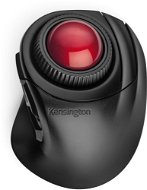
Interested in reviews of Kensington Orbit Fusion Wireless Trackball? It got 4.0 out of 5 stars from our customers. Find specific customer reviews of Kensington Orbit Fusion Wireless Trackball below. We will appreciate if you also share your experiences with Kensington Orbit Fusion Wireless Trackball after purchasing.
I had the old Orbit before and I liked it. For the original Orbit, however, the left button leaves after two years - either it doesn' t click or twice. It can be fixed, but I was fascinated by the combination of buttons, so I went into innovation. Orbit Fusion is slightly higher and the original one had such a tongue in front as a pad = the first habit. But it took about 5 hours and I already had it in my hand. I have a really big hand, so my fingertips reach the very edge of the buttons. Fortunately, they work absolutely great there, so no problems.
You also have to get used to the new buttons. So jumping a page forward or back will initially make sure you take care of it before you realize it' s 1cm above your thumb. Full button programming is ideal, so if you don' t want to change it, don' t even download the software. He can' t do much and you can set the sensitivity of the ball and the wheel in Win. A pleasant surprise is the gray button, which has the function of turning on automatic scrolling from the factory. I' ve always missed that on all trackballs, and here it' s finally solved. And it goes softly and smoothly.
The wheel is “portrait“ compared to the previous model. And again, it' s a habit, and now I feel it' s more intuitive. When set to two lines, it' s slow, but much clearer.
I' ve always considered switching sensitivity to be nonsense - everyone chooses it once and then stays with it. I still have a tiny mobile mini trackball connected to the computer and a pen with a tablet for painting. Everything works at the same time. And to that sensitivity - when I describe or paint some drawings, I switch to a pen. But now I tried to keep the sensitivity to a minimum and I was surprised that you can also nicely edit photos in detail. So it is possible that I will shut down the pen completely.
Not to mention - I would make a surface treatment on the left and right buttons so that the surface can be immediately distinguished from the surroundings of the button. Before you get used to the exact position of your fingers, it' s a bit of searching and making sure you' re on the button and not on the body of the track. One tiny piece of matter would be enough, and it would be clear immediately.
Otherwise, despite the included USB> USB-C reduction, this trackball also works on a mobile phone, which can be used for presentations.
Fits nicely in the hand
3 sensitivities can be switched quickly
6 buttons + wheel
Wireless
The package also includes a USB-C dongle adapter
Fits well on the board (soft rubber at the bottom around the perimeter)
I have big hands and it' s “just-so-so“. But still fine
The software is quite childish and the wheel can only be set from Windows.
He is very sensitive. Before I get used to it, when I move my hand from the left side above it, I press the buttons with my little finger. But it' s a habit
He' s tall enough, but maybe I' ll work it out with a soft pad in front of him. I' ll see in time.
If you want to adjust the position of the track on the table, you almost always press one of the buttons. It is necessary to learn a safe oblique grip outside the buttons.
0 ×Report
Automatic translation
P-DC1-WEB10
Bei uns geht's schnell!Waren, die auf Lager sind, versenden wir innerhalb von 24 StundenMore info »