Try our cookies Alza.cz a. s., Company identification number 27082440, uses cookies to ensure the functionality of the website and with your consent also to personalisage the content of our website. By clicking on the “I understand“ button, you agree to the use of cookies and the transfer of data regarding the behavior on the website for displaying targeted advertising on social networks and advertising networks on other websites.
Alzak icon
Catalogue
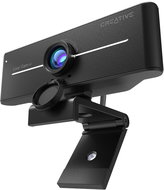
Creative Live! Cam 4K - Webcam

Reviews Creative Live! Cam 4K

Interested in reviews of Creative Live! Cam 4K? It got 4.2 out of 5 stars from our customers. Find specific customer reviews of Creative Live! Cam 4K below. We will appreciate if you also share your experiences with Creative Live! Cam 4K after purchasing.
72.90 €
In stock 3 pcs
Add to Cart More Information

User Reviews

Karel, Praha 10flag
Rated 11/02/2026, variant Creative Live! Cam 4K
Verified purchase
Great webcam with good quality and sufficient picture and sound. I would compare the quality to a normal mobile phone, where the picture is better than the front camera but worse than the rear camera. Compared to the phone, however, the camera does not have such a sound to picture delay, it is only a few milliseconds (with 2Gb/s internet). The camera's 360° rotation and 30° tilt allows you to place the camera almost anywhere and it will always capture what you need. This may be a limitation of the weaker and lighter construction, but the camera can be clipped to the monitor, or the mount has a screw fixing option. Or you can attach e.g. to the monitor base with double-sided tape, as I finally solved it. Overall, a very good webcam, for home and work use, which does not offend either by image or sound and certainly does not shame e.g. at a job interview.
Good enough image quality
Auto focus
High-quality audio input and output, even when you're further away from the camera
Audio to video delay of only a few milliseconds
Compatible with most applications used (e.g. Skype, Teams, Google Meet,. )
Ease of operation and wiring/installation
360° camera rotation and 30° tilt
Wide angle 95°
Can be used not only on PC but also on other devices
Absence of remote control
4K image quality doesn't match the quality you're imagining
Lightweight and not very stable construction
0 ×Report
Automatic translation
Jaroslava, Libeřflag
Rated 06/02/2026, variant Creative Live! Cam 4K
Verified purchase
The webcam met my expectations. Wiring is very quick and easy, with no complicated installation - once connected, it works immediately. The image quality is crisp, sharp and the image is natural even in normal home lighting. I also like the size of the camera, it's compact and doesn't get in the way on the table. A big plus is the ability to tilt the camera, which makes it easy to set the ideal angle of view as needed. I didn't use the built-in microphone because I use a headset with its own microphone, so I can't evaluate its quality. The only drawback I see is the mounting options - the camera can only be placed on a table. The stand is stable, but I would appreciate the possibility to hang or attach the camera from above, for example on a monitor or shelf.
appearance
speed of connection
nice picture
small attachment possibility
0 ×Report
Automatic translation
Jaroslava, Chvalčovflag
Rated 01/02/2026, variant Creative Live! Cam 4K
Verified purchase
Be careful what you use this camera for. A secondary camera to capture the table or wide shot as you write on the board or monitor the 3D printer is good. But not for video calls. Thanks to the wide shot you are not visible and constantly pressing the button to balance the backlight according to the sun.
4K resolution
Wide Angle
Good for 3D printer monitoring
There is no zoom in windows, so either you have to have the camera 30cm from your face or you can hardly see
The backlight balancing is not automatic but on the button
Non-removable USB-A nowadays?
For the price, I don't recommend it
0 ×Report
Automatic translation
Jiří, Červený Újezdflag
Rated 28/01/2026, variant Creative Live! Cam 4K
Verified purchase
The camera contains everything I need. The most important thing is the image, which the camera fulfils perfectly even in a dim room. Alternatively, a button can be used to increase the brightness to compensate. I also appreciate the plug n play without the need to install additional software (in the Creative App there is also the possibility to adjust the Backlight compensation), the microphone on indicator (small LED in the upper left corner) and the LED strip lighting up when using the camera application. The stability of the attachment to the monitor or laptop is sufficient, it is just possible to tune the position when using the physical buttons, especially when turning off the microphone, as you need to hold the camera firmly with two fingers and then move the position with the third. Here I would rather welcome a click button.
Price/performance
Quality image
plug n play
Cover
Microphone on indicator + camera usage by apps
Brightness can be changed with the button
Switch to turn off the microphone better would be a button
0 ×Report
Automatic translation
Vojtěch, Veselí nad Lužnicíflag
Rated 24/01/2026, variant Creative Live! Cam 4K
Verified purchase
I work from home and like to have a nice empty desk, so the laptop has its place on the shelf. But I need a webcam for meetings, and I was tired of constantly taking my laptop off the dock just to use the webcam on it. I didn't have very high expectations, I take the webcam as such a purposeful thing. I'm pleasantly surprised by this one, I use primarily LED strip in my office (4000K temperature, something around 1200 lumens), so my office is relatively dark after dark. The webcam handled this gloom and temperature quite well, I was always a bit too dooranzhova on my laptop. So, for me, thumbs up on this one. 4k is nice to have for better background detection in teams, but I don't see it as a necessity for webcams. For some livestream I would probably go down to 1080p and 60FPS. There is a tripod thread on the leg (it looks like 3/4), the lens has manual focus and a rubber cap that can't be completely removed (but it is irreversible). The vertical tilt of the camera is at about 30 degrees. I can imagine having this camera somewhere static, for example in a 3D printer (where manual focusing has many advantages over autofocus), also thanks to the width of the frame (95 degrees horizontally) and the already mentioned quality of the shot in lower light (but the size could be a problem, the camera is bigger). The stand is sturdy and the rubberized feet hold the monitor nicely both straight and bent. I haven't tried the microphone much yet, no reason when I have a much better one on my headphones. I like that I can turn it off right on camera. I'd mainly fault the cable. It is quite short (about 2m which is enough for carrying but for fixed installation in meeting rooms sometimes more is needed) and without braid (which is also not a problem, I am just spoiled by braided cables). When the camera is running, a strip lights up on both sides of the lens (see photos), so you can't miss that something is using it. Otherwise, only a small light in the corner shows that the camera is connected. The photo of the objects on the cutting mat is taken through the default windows camera app, without editing, in 4k. The only illumination was the mentioned LED strip.
Recording quality in dim/low light
Price
Various niceties like tripod thread, lens cap, microphone switch
Manual sharpening
No visible indication of camera use by apps
Short cord
Plastics look cheaper
0 ×Report
Automatic translation
P-DC1-WEB25

Vielfältige Zahlungsoptionen Einfache Bezahlung mit Karte, PayPal, Klarna oder Bitcoin More info »