Try our cookiesAlza.cz a. s., Company identification number 27082440, uses cookies to ensure the functionality of the website and with your consent also to personalisage the content of our website. By clicking on the “I understand“ button, you agree to the use of cookies and the transfer of data regarding the behavior on the website for displaying targeted advertising on social networks and advertising networks on other websites.
We use 8 categories of cookies on our website:
Technical cookies
These are strictly necessary for the functioning of the website and the features you choose to use. Without them, our website would not work; you wouldn't be able to log in to your user account, for example.
Functionality cookies
These cookies allow us to remember your basic choices and improve the user experience. These include remembering your preferred language or allowing you to stay logged in permanently.
Social media cookies
These cookies allow us to easily link you to your social media profile and, for example, allow you to share products and services with your friends and family.
Content personalisation
These cookies allow us to show you content and ads according to the information we have about you to best meet your needs. This includes what content you have viewed, or on what device you are accessing our website.
Non-personalised advertising
These cookies allow us to show you general ads for products and services.
Personalised advertising
Thanks to these cookies, we and our partners can offer you relevant products and services based on your purchases, your shopping behaviour and your preferences.
Audience metrics
These cookies allow us to optimise our site for your convenience based on how you use it. The aim is to remember or anticipate your choices. This includes, for example, the use of features, their location, or the behaviour on the page.
Third party cookies
These are third party cookies, and you can find out more about them and our partners here.
By giving your consent to the processing of cookies, functionality and analytical cookies will be installed on the device you use to browse the website (click on the "I understand" button for both categories, or you can select only one of the categories by clicking on the "Settings" button). We always install technical cookies on your device, even without your explicit consent, because without them our website would simply not work.
You can revoke your consent to the processing of cookies. In connection with our company's cookie processing, you also have the following rights: the right to access cookies, delete, modify, supplement and correct them, restrict processing and the right to lodge a complaint with the Office for Personal Data Protection. Read more about your rights.
Interested in reviews of Acemagic T8-PLUS N100 (16+0) Silver? It got 3.8 out of 5 stars from our customers. Find specific customer reviews of Acemagic T8-PLUS N100 (16+0) Silver below. We will appreciate if you also share your experiences with Acemagic T8-PLUS N100 (16+0) Silver after purchasing.
Verified purchase - review from a price comparison website
It has its disadvantages which directly linked to the advantages. Just a smaller ssd 2242, built-in operating memory with no option to change. Poor bios, but seda live.
I've been racking my brain: input to bios via ESC, auto start after power on: State After G3 - S0 State.
In the analysis, beware:
* The cover holds the barrel Jack. Just a 0.5mm bigger hole around the jack and it would be easy. The necessary strength and traction.
* Antennas and bios battery are glued to the silver cover. See photo. They have short handcuffs.
* The screw to attach the disk is two-piece but difficult to disassemble (see picture) I first tested the RAM for size. It's 16BG. In bios underclocked to 3200MHz. He can handle more. By default LAN2 is disabled in the bios. During installation, only one extreme HDMI worked. I forgot to test the others. BT and Wifi also didn't work when installing Win10. Require drivers to be reinstalled. ****** glitch *******
After about 2 hours of operation, (1 hour after installing Win 10) the blue deaths started popping up. Cause - disk disconnection. Recheck wiring, update disk firmware, disable idle on PCI. nothing helped. Tested by boot tests outside Windows.
It always disconnects after a few minutes, regardless of activity.
After disconnecting the disk it is necessary to turn off the power to the PC, otherwise it will not appear in the BIOS. Sometimes it won't even turn off. The disk was SK Hynix BC511. Extended OEM drive for laptops from 2020. Thoroughly tested on 2015, 2021 and 2024 PCs. No problems. Because of the use of an unused SSD, I bought this cheap PC as an alternative to the Raspberry 5. It was supposed to run Home Assistant and multimedia. The error is either in HW or bios. Such a widespread and several years old model should be supported, or a list of unsupported drives/controllers should be provided. If it's a bios issue, it won't be resolved due to lack of support. I'm coming back.
Small and decently powerful
Noiseless off load, like a quieter laptop under load.
CPU temperatures max 60°C
In the package there is HDMI cable (about 0,5-0,7m) and mounting plate (about vesa 100) and set of screws
On mine, the SK Hynix BC511 M.2 NVME drive kept disconnecting. I'm coming back.
Little space in the case, so the disk gets hot. The case was supposed to be perforated.
Lack of support for non-drivers on dropbox. That doesn't seem credible. You won't find this model on the manufacturer's website.
Cheap 12V/2.5A old type power supply. Bigger and warmer. Too bad it doesn't have USB-C.
Does not have a reset button
Few usb and unnecessary HDMI and a second 1GB/s LAN. But that's not a flaw.
Impractical SSD size. You can mount the 2230 if you use a reducer or DIY bracket (a piece of plastic with a screw hole. )
With this mini-pc I replaced an older home server, a classic minitower with 70Watt consumption. Now I have a more powerful one with a power consumption of about 15Watts and it is more compact. I just have the drive in an external usb box, however it works reliably. For me, a better performance-consumption ratio than the Raspberry Pi 5. I have it connected to two monitors and sometimes use it as a desktop PC. I could simply plug in another monitor, but that would be pointless.
Used it as a Proxmox server and after a few days of use so far complete satisfaction. The device is quiet. With a little bit of skill you can also use a 2230 format SSD.
So in the end I have to change the rating to 1 star. The computer has (at least my piece had) a spoofed RAM (it shows 16GB, it has 8GB). I appreciate Alza's approach for a prompt and hassle-free refund.
Intel N100 processor - so relatively powerful with very low power consumption.
Tiny and quiet
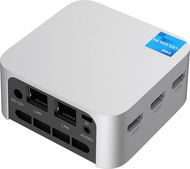
Richly equipped with ports (RJ45, HDMI, USB-A)
It doesn't contain any disc (which is what I was counting on), but to put it in, you have to get through 2 "layers" of screws. Which wouldn't be a problem if a mini narrow screwdriver, not included, wasn't needed to disassemble the second layer.
M.2 2242 Nvme (instead of the more common 2280). These are much more expensive, but with a bit of skill you can use the 2280, except that it can't be put back together (which doesn't matter for functionality).
For the price, a great solution for a small office PC or home server with very little power consumption. At the time of writing, there are errors in the text description: - Inside is the Intel N100, not the N95. - M.2 slot supports both NVMe and SATA SSDs
- The PC comes with a Windows 11 Pro license
small size
very low power consumption (realistically below 10W)
M.2 slot supports both NVMe and SATA SSDs
WIndows 11 Pro license included
active cooling
a little more difficult to dismantle
0 ×Report
Automatic translation
P-DC1-WEB20
Auf Nummer sicher!Mit einer verlängerten Garantie bis um 3 JahreMore info »