


Ergonomics & Healthy Posture
Sitting and working at a computer will obviously not make you an athlete, but it doesn't have to cause direct harm such as back, arm or neck pain. That's why it's essential to build an ergonomic workstation, which means much more than just trying not to slouch. There are a number of practices and rules that will make your computer work much healthier.
Ergonomics is essential for the comfortable use of computers. Proper desk seating and several ergonomic tools will increase your productivity and prevent ailments such as carpal tunnel syndrome and back pain. How can you sit properly and which devices will help you? Just follow our advice.
Continue
701
Results


AlzaErgo Table ET2 Core black + 140×80 cm bamboo board
Height Adjustable Desk - electrically adjustable, width 90.9–145.8cm, height 71.5–116cm, 1 motor, anti-collision system to prevent accidents and injuries, two 2-segment rectangular legs, 2 hooks for hanging accessories, button control panel with display, memory for 4 positions, steel construction, levelling feet, weight capacity 80kg, power cord length 1.5m, includes a bamboo board measuring 140× 80×1.9 cm (W×D×H), no pre-drilling required

AlzaErgo Table ET2 Core white + top 160×80 cm laminated white oak
Height Adjustable Desk - Electrically adjustable, width 90.9–145.8cm, height 71.5–116cm, 1 motor, anti-collision system to prevent accidents and injuries, two 2-segment rectangular legs, 2 hooks for hanging accessories, button control panel with display, memory for 4 positions, steel construction, leveling feet, load capacity 80kg, power cord length 1.5m, includes a tabletop in white oak finish measuring 160 × 80 × 1.8cm (W×D×H), no pre-drilled holes
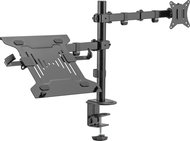
AlzaErgo Arm D05LB FlexMount
Monitor Arm - for 17" to 32" monitor, included holder for 10" to 15.6" laptop, independent height adjustment, maximum load capacity 18 kg (9 kg/shoulder when using monitors), load capacity of the arm with laptop holder 4 kg, quick-release VESA plate, installation on table edge (10-85 mm) or grommet plate (10-40 mm), the monitor can be tilted (+/- 45°), rotate (180°) and swivel (360°), pivot, VESA 75×75 and 100×100 mm, cable management system, mounting kit in the package

AlzaErgo Table ET2 Core white + top 120×80 cm laminated oak
Height Adjustable Desk - Electrically adjustable, width 90.9–145.8cm, height 71.5–116cm, 1 motor, anti-collision system to prevent accidents and injuries, two 2-segment rectangular legs, 2 hooks for hanging accessories, button control panel with display, memory for 4 positions, steel construction, leveling feet, load capacity 80kg, power cord length 1.5m, includes an oak-finish tabletop measuring 120 × 80 × 1.8cm (W×D×H), no pre-drilled holes

AlzaErgo Table ET2 Core white + top 140×80 cm laminated oak
Height Adjustable Desk - Electrically adjustable, width 90.9–145.8cm, height 71.5–116cm, 1 motor, anti-collision system to prevent accidents and injuries, two 2-segment rectangular legs, 2 hooks for hanging accessories, button control panel with display, memory for 4 positions, steel construction, leveling feet, load capacity 80kg, power cord length 1.5m, includes an oak-finish tabletop measuring 140 × 80 × 1.8cm (W×D×H), no pre-drilled holes

AlzaErgo Table ET2 Core white + top 120×80 cm laminate white
Height Adjustable Desk - Electrically adjustable, width 90.9–145.8cm, height 71.5–116cm, 1 motor, anti-collision system to prevent accidents and injuries, two 2-segment rectangular legs, 2 hooks for hanging accessories, button control panel with display, memory for 4 positions, steel construction, leveling feet, load capacity 80kg, power cord length 1.5m, includes a white tabletop measuring 120 × 80 × 1.8cm (W×D×H), no pre-drilled holes

AlzaErgo Table ET2 Core White + 120×80cm Bamboo Tabletop
Height Adjustable Desk - electrically adjustable, width 90.9–145.8cm, height 71.5–116cm, 1 motor, anti-collision system to prevent accidents and injuries, two 2-segment rectangular legs, 2 hooks for hanging accessories, button control panel with display, memory for 4 positions, steel construction, levelling feet, weight capacity 80kg, power cord length 1.5m, includes a bamboo board measuring 120×80×1.9cm (W×D×H), no pre-drilling required

AlzaErgo Table ET2 Core white + top 140×80 cm bamboo rounded
Height Adjustable Desk - Electrically adjustable, width 90.9–145.8cm, height 71.5–116cm, 1 motor, anti-collision system to prevent accidents and injuries, two 2-segment rectangular legs, 2 hooks for hanging accessories, button control panel with display, memory for 4 positions, steel construction, leveling feet, weight capacity 80kg, power cord length 1.5m, includes a bamboo board with rounded corners measuring 140 × 80 × 1.9cm (W×D×H), no pre-drilling required

AlzaErgo Table ET2 Core white + board 160×80 cm bamboo
Height Adjustable Desk - electrically adjustable, width 90.9–145.8cm, height 71.5–116cm, 1 motor, anti-collision system to prevent accidents and injuries, two 2-segment rectangular legs, 2 hooks for hanging accessories, button control panel with display, memory for 4 positions, steel construction, levelling feet, weight capacity 80kg, power cord length 1.5m, includes a bamboo board measuring 160×80×1.9cm (W×D×H), no pre-drilling required

AlzaErgo Table ET2 Core white + top 120×80 cm laminated birch
Height Adjustable Desk - Electrically adjustable, width 90.9–145.8cm, height 71.5–116cm, 1 motor, anti-collision system to prevent accidents and injuries, two 2-segment rectangular legs, 2 hooks for hanging accessories, button control panel with display, memory for 4 positions, steel construction, leveling feet, load capacity 80kg, power cord length 1.5m, includes a birch-finish tabletop measuring 120 × 80 × 1.8cm (W×D×H), no pre-drilled holes
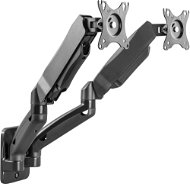
AlzaErgo Arm D42B Wall
Monitor Arm for walls, 17" to 32", max load of 18kg, tilt + 90° / - 45°, rotating 180°, rotation 360°, VESA 100×100 and 75×75 mm
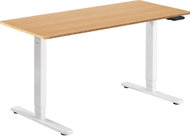
AlzaErgo Table ET1 Essential white + top 140×80 cm bamboo rounded
Height Adjustable Desk - electrically adjustable, width 100–170cm, height 62–128cm, 2 motors with a speed of 38mm/s and noise level up to 60dB, button control with display, memory for up to 3 positions, anti-collision system with adjustable sensitivity (8 levels), timer to remind you to change your working position, load capacity 100kg, power cable length 3m, includes a bamboo top with rounded corners measuring 140 × 80 × 1.9cm (W×D×H), without pre-drilled holes
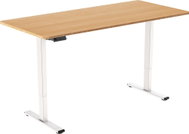

AlzaErgo Table ET2 Essential white + top 140×80 cm bamboo rounded
Height Adjustable Desk - electrically adjustable, height 71–121 cm, width 85–129 cm, 1 motor with a speed of 25 mm/s and a noise level of up to 50 dB, anti-collision system with 3 sensitivity levels, 2-section rectangular legs, cable management system, push-button control panel with display, memory for 4 positions, material steel, leveling feet, load capacity 70 kg, power cable length 3.1 m, including a bamboo table top with rounded corners measuring 140 × 80 × 1.9 cm (W×D×H), without pre-drilling
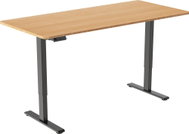
AlzaErgo Table ET2 Essential black + top 140×80 cm bamboo rounded
Height Adjustable Desk - electrically adjustable, height 71–121 cm, width 85–129 cm, 1 motor with a speed of 25 mm/s and a noise level of up to 50 dB, anti-collision system with 3 sensitivity levels, 2-section rectangular legs, cable management system, push-button control panel with display, memory for 4 positions, material steel, leveling feet, load capacity 70 kg, power cable length 3.1 m, including a bamboo table top with rounded corners measuring 140 × 80 × 1.9 cm (W×D×H), without pre-drilling

AlzaErgo Table ET2 Core black + board 140×80 cm bamboo rounded
Height Adjustable Desk - Electrically adjustable, width 90.9–145.8cm, height 71.5–116cm, 1 motor, anti-collision system to prevent accidents and injuries, two 2-segment rectangular legs, 2 hooks for hanging accessories, button control panel with display, memory for 4 positions, steel construction, leveling feet, weight capacity 80kg, power cord length 1.5 m, includes a bamboo board with rounded corners measuring 140 × 80 × 1.9cm (W×D×H), no pre-drilling required
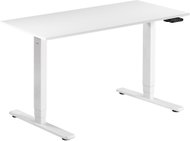

AlzaErgo Table ET1 Essential white + top 120×80 cm lamino white
Height Adjustable Desk - electrically adjustable, width 100–170cm, height 62–128cm, 2 motors with a speed of 38mm/s and a noise level of up to 60dB, button control with display, memory for up to 3 positions, anti-collision system with adjustable sensitivity (8 levels), timer to remind you to change working position, load capacity 100kg, power cable length 3m, includes a white tabletop measuring 120 × 80 × 1.8cm (W×D×H), without pre-drilled holes
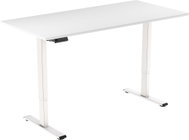
AlzaErgo Table ET2 Essential white + top 120×80 cm lamino white
Height Adjustable Desk - electrically adjustable, height 71–121 cm, width 85–129 cm, 1 motor with a speed of 25 mm/s and a noise level of up to 50 dB, anti-collision system with 3 sensitivity levels, 2-section rectangular legs, cable management system, push-button control panel with display, memory for 4 positions, material steel, leveling feet, load capacity 70 kg, power cable length 3.1 m, including table top in white, dimensions 120 × 80 × 1.8 cm (W×D×H), without pre-drilling
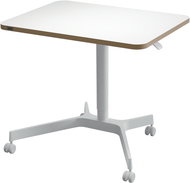
LEITZ Ergo mobile 80 x 60 cm, white
Height Adjustable Desk - rectangular, with dimensions 114×80×60 cm (H × W × D), board made of chipboard, steel construction, castors, total weight 11 kg
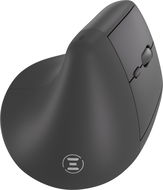


Eternico Wireless Vertical Mouse MVSB395
Mouse - vertical, wireless, optical, 1600DPI, 6 buttons, DPI settings and silent, miniature sensor, cord length: 0.8m, bluetooth and 2,4GHz radio frequency connection, black
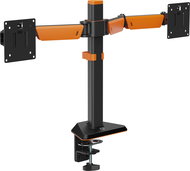

Rapture NEBULA DX black
Monitor Arm for tables and with desk grommet, 17" to 32", max load of 24kg, tilt + 60° / - 60°, rotating 180°, rotation 360°, VESA 100×100 and 75×75 mm
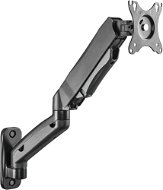
AlzaErgo Arm S41B Wall
Monitor Arm for walls, 17" to 32", max load of 9kg, tilt + 90° / - 45°, rotating 180°, rotation 360°, VESA 100×100 and 75×75 mm
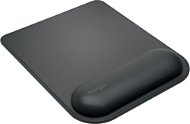

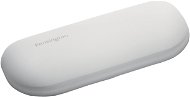

Kensington ErgoSoft K50432EU
Wrist Rest - material: artificial leather, anti-slip base, size: 15,2 × 1,8 × 7,3cm, grey colour
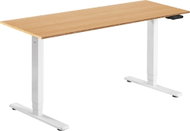
AlzaErgo Table ET1 Essential white + top 160×80 cm bamboo
Height Adjustable Desk - electrically adjustable, width 100–170cm, height 62–128cm, 2 motors with a speed of 38mm/s and noise level up to 60dB, push-button control with display, memory for up to 3 positions, anti-collision system with adjustable sensitivity (8 levels), timer to remind you to change working position, load capacity 100kg, power cable length 3m, includes a bamboo desktop measuring 160 × 80 × 1.9cm (W×D×H), without pre-drilled holes
 Alza Days
 Ergonomic Chairs
 Height Adjustable
 Mouse Pads
 Mice
Mice
 Keyboard
 Mounts for Monitors
 Monitor Stands
 Foot Rests
 Lumbar & Back Rests
 Sitting Balls
 Jak správně sedět
Ergonomie: Jak zdravě pracovat?
Jak správně sedět
Ergonomie: Jak zdravě pracovat?
No longer sold
In the category Ergonomics & Healthy Posture on Alza.de, we currently have a total of 701 products, which you can easily buy online and get quickly delivered. See all of your purchases and make orders on our easy-to-use app.
Chcete doručit do České republiky? Jdi na
Ergonomie a zdravé sezení
Chcete doručiť tovar na Slovensko? Prezrite si
Ergonómia a zdravé sedenie
Für den Versand nach Österreich, besuchen Sie bitte
Ergonomie am Arbeitsplatz
Magyarországra rendelnél? Látogasd meg ezt a termékkategóriát
Ergonomikus irodai eszközök
