Try our cookies Alza.cz a. s., Company identification number 27082440, uses cookies to ensure the functionality of the website and with your consent also to personalisage the content of our website. By clicking on the “I understand“ button, you agree to the use of cookies and the transfer of data regarding the behavior on the website for displaying targeted advertising on social networks and advertising networks on other websites.
Alzak icon
Catalogue
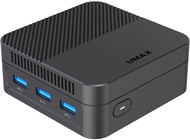
Umax U-Box N10 Plus - Mini PC

Reviews Umax U-Box N10 Plus

Interested in reviews of Umax U-Box N10 Plus? It got 4.7 out of 5 stars from our customers. Find specific customer reviews of Umax U-Box N10 Plus below. We will appreciate if you also share your experiences with Umax U-Box N10 Plus after purchasing.

User Reviews

Michal, Milevskoflag
Rated 15/08/2025, variant Umax U-Box N10 Plus
Verified purchase
tiny and lightweight design
monitor mounting bracket
sufficient performance for youtube etc.
fully functional bluetooth for audio needs
poor wifi antenna performance, I had to get an extender to a nearby socket and connect it with a cable, then it works as it should
0 ×Report
Automatic translation
Martin, Opava 5flag
Rated 03/08/2025, variant Umax U-Box N10 Plus
Verified purchase - review from a price comparison website
Win11 pro
0 ×Report
Automatic translation
Milan, Praha 4 - Chodovflag
Rated 14/07/2025, variant Umax U-Box N10 Plus
Verified purchase - review from a price comparison website
Win 11 settings
the assembly good everything worked as it should
0 ×Report
Automatic translation
Petr, Plzeňflag
Rated 05/02/2025, variant Umax U-Box N10 Plus
Verified purchase - review from a price comparison website
Good performance/price ratio
0 ×Report
Automatic translation
Anonymous customerflag
Rated 09/12/2024, variant Umax U-Box N10 Plus
Verified purchase
It's smaller than you'd expect. It's cute and functional. But it heats up more than I would expect from an actively cooled box. Only loaded BIOS (i.e. zero load) shows CPU temperatures of 35-40/43°C at 2500 rpm. In the device test (Passmark Benchmark) on Win11, the maximum temperature was 88°C. With OPNsense loaded, the temperature was between 60-75°C - with minimal load and on a normal internet connection (no PPPoe, VPN,. ), CPU basically without activity. Checking the heat conductive paste and applying a new one (from the factory there was enough paste to last 3 PCs) + the first BIOS adjustment, which got the speed to 5000 (it was already humming too much), kept the temperature in the BIOS at 30-35°C. The second BIOS modification with 3500 rpm and loaded OPNsense kept the temperature at 45-50°C. The fan is a bit audible, partly by humming and partly by whistling at a higher frequency, but it's nothing terrible that would be a major disturbance during the day, etc. But you probably won't fall asleep next to it. After resetting the BIOS settings (and therefore only thanks to the adjustment of the heat conductive paste) the temperature in the loaded OPNsense remains at 55-60°C. For the Intel N100, perhaps temperatures up to 70-80-90°C would be OK, but for durability reasons I would welcome more efficient cooling. The fan looks like it's spinning more for fun than for air volume exchange. The vents don't really seem to suck in any volume of air, nor do they let the warmer air out. We will see in time if there will be a need and possibility to upgrade the cooling in some way. The Ethernet controller is from Realtek. I'd rather have Intel, but for the average user it's probably fine. So far it runs OK even with OPNsense 24/7 at expected speeds and without any failures. The manufacturer's customer support is zero. Before buying it I wanted to check just what Ethernet controller is in the box, but I can't connect to them. Nor with their service center through inquiry about the temperatures described above. No one answers the phones they have listed on the website. Is it too expensive for what it is? It's probably not overpriced, but a price 1K lower would be more interesting. Or easily the same price if it was tightened up (through cooling efficiency).
Small
Sufficient power for OPNsense / pFsense
Nice construction, workmanship looks good
Low power consumption (adapter via USB-C and at 36W)
Active cooling efficiency
Humming + fan whistling at higher speeds
Manufacturer Customer Support
0 ×Report
Automatic translation
Zdeňka, Praha 1flag
Rated 15/11/2024, variant Umax U-Box N10 Plus
Verified purchase
Price/performance I believe is top of the market:
Great device for common user needs with 2024 technologies - usb-c power supply, total 3x monitor output HDMI, DP, 2x LAN, CPU N100, 8GB 4.7GHz RAM. or great satisfaction.
Personally I use as an advanced network "hub" and with that I installed Linux (Ubuntu 24) in dual boot mode with OEM WIN from the statement. Everything is running great and stable - both in WIN and Ubuntu. With Linux, it's good to mention that when examining Ubuntu more, I point out the BIOS - it doesn't meet all the security criteria - which when you look at the BIOS kind of suggests that it will. In the rest of the device it has passed all HW, security and Ubuntu verifications and is fully HW compatible.
During heavy computing load you can hear a slight fan hum - which some may consider a minus - but thanks to this, the CPU frequency is kept above 3GHz, so there are no significant performance fluctuations as with purely passive cooling (which some mini PCs have).
Overall a nice innovation from UMAX for the end of 2024 and for me a great satisfaction.
The cons are subjective and listed in the pluses, or for completeness - a slight hum is heard at higher loads.
BIOS security is not 100% OK for Ubuntu 24.04.1 LTS, however the device in HW is SW is fully compatible even on Linux - the mismatch is in non-critical places of the security BIOS.
0 ×Report
Automatic translation
P-DC1-WEB20

Studentenrabatte Studierst du? Nutze die Rabatte von ISIC und "iamstudent"! More info »