


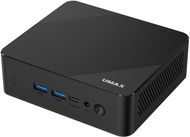
Reviews Umax U-Box A15 Pro
Interested in reviews of Umax U-Box A15 Pro? It got 3.9 out of 5 stars from our customers. Find specific customer reviews of Umax U-Box A15 Pro below. We will appreciate if you also share your experiences with Umax U-Box A15 Pro after purchasing.
User Reviews

Jan, Letohrad
Rated 11/12/2025, variant Umax U-Box A15 Pro
Verified purchase
Simple, fast and hassle-free installation
We have it for office work, and it's perfectly adequate
Large RAM and disk capacity
0 ×Report
Automatic translation

JCEE, s.r.o., Lanškroun
Rated 03/11/2025, variant Umax U-Box A15 Pro
Verified purchase
-WIN 11PRO pre-installed
-Large 512GB installed disk capacity
-Instruction in Czech -including miniPC analysis and shortcuts for WIN.
Even with the supplied 16GB RAM, the miniPC runs briskly
-Standard unnecessary pre-installed MS OFFICE in about 8 languages: -D
0 ×Report
Automatic translation

Company
Rated 31/07/2025, variant Umax U-Box A15 Pro
Verified purchase
The Umax U-Box A15 Pro, is by far one of the worst "new" computers I have ever gotten my hands on. After the first boot, instead of the installation wizard, the Windows login for the defaultUser0 user appeared and it asked for a password! After a few attempts to work around it, I gave up and made a clone of the disk thinking it might have drivers on it, but there was nothing there. I did a clean install from the original image and it was quite a massacre. Windows 11 Pro OEM activation failed with a message that Windows is already activated on another computer. I had to install the component drivers, including the network card, manually, but mostly before that I had to look them up one by one on the internet, because you can't find them on the umax website at all. After successfully completing the installation, I discovered that the computer has neither WiFi nor bluetooth. When installing updates, the processor was running at max and the disk was running at 1%, so it's not really fast. Still, I will keep the computer because it suits my use.
0 ×Report
Automatic translation
