


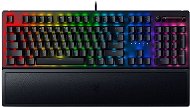
Reviews Razer BlackWidow V3 (Yellow Switch)
Interested in reviews of Razer BlackWidow V3 (Yellow Switch)? It got 4.8 out of 5 stars from our customers. Find specific customer reviews of Razer BlackWidow V3 (Yellow Switch) below. We will appreciate if you also share your experiences with Razer BlackWidow V3 (Yellow Switch) after purchasing.
User Reviews

Anonymous customer
Rated 18/08/2023, variant Razer BlackWidow V3 (Yellow Switch)
Verified purchase
At first glance, a very cheap keyboard. Until you lay your hands on it and start writing. Someone thought about it, and designed the keyboard to work, not for the eyes, but for the touch. The keyboard is more or less not twisted at all despite the metal dominating the plastic, the keys do not ghost at all, even with a really poor press. Compared to the MX Cherry red, it takes a bit more effort to press, which may not suit everyone, but it fit me like a glove. In short, if you don't care about the stupidly exaggerated RGB backlighting, but rather need it to work, this entry level keyboard from Razer will surely fit the bill. As I mentioned in the bullet points, it looks like it can withstand rougher treatment. I probably wouldn't throw it out the window, but you don't have to worry about breaking it on the first hit.
Surface of keys (rough and does not slip even with sweaty hands)
Relatively small size compared to other full size keyboards
Volume wheel + compact multimedia control
Razer's Yellow switch is a bit quieter than the MX Cherry Red and puts a bit more resistance when pressed. This leads to a reduction in the number of missclicks during inflammation.
Keyboard font
Hand pad included
Finally a keyboard without the rattling and rough left Shift: ))
He looks like he can take the occasional punch: )
The hand pad does not attach to the keyboard and is freefloating. So sometimes I chase her around the table with my palm.
The backlighting is a bit faded in places, especially in the windows section of the insert, home, delete etc buttons.
It's awfully high, so you really need a pad
Some keys differ significantly in sound when pressed. I don't know if it's intentional or a mistake, but either way, it drives me crazy. Backspace clicks like a hot plate on a kitchen counter.
0 ×Report
Automatic translation
