


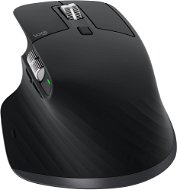
Reviews Logitech MX Master 3 Mid Black
Interested in reviews of Logitech MX Master 3 Mid Black? It got 4.8 out of 5 stars from our customers. Find specific customer reviews of Logitech MX Master 3 Mid Black below. We will appreciate if you also share your experiences with Logitech MX Master 3 Mid Black after purchasing.
User Reviews

Company
Rated 13/03/2023, variant Logitech MX Master 3 Mid Black
Verified purchase
I recommend buying a wrist rest
Great battery
Ergonomics amazing
Design great
The left mouse button went soon
0 ×Report
Automatic translation
Anonymous customer
Rated 03/02/2023, variant Logitech MX Master 3 Mid Black
Verified purchase
Great for work
Ergonomics
Long battery life (with daily use I recharge once every 3-4 months)
Personalisation of buttons
Higher purchase price
0 ×Report
Automatic translation

Pavel, Roztoky
Rated 25/06/2022, variant Logitech MX Master 3 Mid Black
Verified purchase
Taken as a replacement for the old MX700, it works great
fits well in the hand
everything OK
0 ×Report
Automatic translation
Anonymous customer
Rated 06/01/2022, variant Logitech MX Master 3 Mid Black
Verified purchase
I've been using the logitech brand for a long time, and after a few bad experiences with other brands I came back to them again. I would need the side rotating wheel to work the other way around, but it's just a matter of habit. the advantage is the setting of the function of some buttons through logitech options, the ability to set the wheel arresting via magnets is good, sometimes when I do not have it on, so when moving the mouse as if it moved the wheel,
wait
middle wheel with or without locking
number of buttons
connection to the old dongle
usb/BT
tazka
price
magnetic wheel detection in free mode
0 ×Report
Automatic translation

Gabriel, Košice
Rated 04/01/2022, variant Logitech MX Master 3 Mid Black
Verified purchase
Perfect ergonomics I recommend it to everyone
The battery lasts a long time
0 ×Report
Automatic translation

Tomáš, Přešťovice
Rated 31/12/2021, variant Logitech MX Master 3 Mid Black
Verified purchase
Solid processing
Very noisy buttons
The scroll wheel has two scrolling modes (fast and slow), but the slow mode is unusable as it jams
Ergonomically interesting, but the mouse is awkwardly shaped in the hand, your palm is in the air outside the mouse
High price
0 ×Report
Automatic translation

Jan, Bakov nad Jizerou
Rated 07/12/2021, variant Logitech MX Master 3 Mid Black
Verified purchase
Maximum satisfaction
Quality workmanship
Works on glass (on a table)
Price
0 ×Report
Automatic translation

Adam, Brno 15
Rated 08/11/2021, variant Logitech MX Master 3 Mid Black
Verified purchase
I've never held a better mouse in my life
Sensor quality
A "magic" wheel that automatically changes the scrolling speed
Profiles for different applications (using Logitech Options software)
Wide range of sensitivity settings
The feeling of "touch"
Size "just right for your hand"
The thumb button is rather hard to press, in combination with gestures, as logitech recommends, it's rather unusable for me. When I move my hand, I let go of the button. Fortunately, behavior can be changed.
Price
0 ×Report
Automatic translation

Daniel, Měník
Rated 17/10/2021, variant Logitech MX Master 3 Mid Black
Verified purchase
light
compared to the mx m2, I don't have to worry about the wheel by the side buttons
0 ×Report
Automatic translation

Ľubor, Povazska Tepla
Rated 05/04/2021, variant Logitech MX Master 3 Mid Black
Verified purchase
excellent grip, wheel and buttons are good/accurate, rubberized surface is nice, on a regular wooden table the sensor reacts well.
I tried to program the buttons too, too bad that for Lightroom you have to make a general profile, where there are no photo commands, rather various system commands
the mouse is more expensive, i.e. the graphite variant, but I have a cheaper black one, because it fits my crate/desks better
otherwise the volume of the buttons is not completely silent, the clicking can be felt, but I don't find it really noisy
0 ×Report
Automatic translation
