


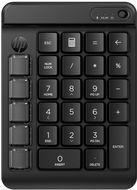
Reviews HP 435 Programmable Wireless Keyboard
Interested in reviews of HP 435 Programmable Wireless Keyboard? It got 4.4 out of 5 stars from our customers. Find specific customer reviews of HP 435 Programmable Wireless Keyboard below. We will appreciate if you also share your experiences with HP 435 Programmable Wireless Keyboard after purchasing.
User Reviews

Pavol, Brno
Rated 19/01/2026, variant HP 435 Programmable Wireless Keyboard
Verified purchase - review from a price comparison website
It's a numpad. If you need it, you know what for.
0 ×Report
Automatic translation
Anonymous customer
Rated 04/01/2026, variant HP 435 Programmable Wireless Keyboard
Verified purchase
I use a tapered ergonomic keyboard without a numpad, but I often use about 6 ALT codes. Normally alt codes don't work in Windows if you're trying to enter them from two devices. There are some ways around this, but they won't work, e.g. in RDP adp. And this programmable keyboard seemed like the solution, unfortunately it failed expectations.
Mechanical keys
Easy connection to PC via bluetooth
Quality workmanship
Programming the M keys is easy
The = and % key changes its function with the language change in Windows (between CZ and EN), I would expect it to keep typing the same thing.
M keys cannot be set to more complex ATL codes. For example, you can program ALT + 92 in it, but ALT + 951753 will not be accepted by the keyboard.
0 ×Report
Automatic translation

Helena, Rakovník
Rated 09/08/2025, variant HP 435 Programmable Wireless Keyboard
Verified purchase
It is important to install the "HP Accessory Center" app from the Microsoft store first and use it to add the 435 programmable wireless keypad. If you pair the keypad to Windows automation, the additionally installed "HP Accessory Center" does not see the keypad. Simply remove and add with the assistance of the HP Accessory Center. I wanted to set the up/down/left/right cursors on keys M2 to M5 in Numlock=on mode, but unfortunately their function depends on the Numlock settings. The manufacturer defined Home, End, PgUp, PgDn, Insert, Delete well, but didn't bother to define Up, Down, Left, Right, or Numlock=On or Numlock=Off. The Numlock works by flipping to the second state.
Perfect technical processing
Setting the keys via the "HP Accessory Center" application (shown in the manual)
Up to 6 keystrokes/characters can be assigned to a key as a macro
Can't set the cursor left/right/down/up to always work no matter how Numlock is currently set
0 ×Report
Automatic translation

Tomáš, Praha 5
Rated 20/07/2025, variant HP 435 Programmable Wireless Keyboard
Verified purchase
It works as it should and the ability to program up to 9 keys is good.
0 ×Report
Automatic translation

Lukáš, Brno
Rated 15/02/2025, variant HP 435 Programmable Wireless Keyboard
Verified purchase
I wanted it primarily for the ability to program the keys. The Mac app, however, is total garbage. I don't understand how a company the size of HP can leak this.
Relatively high quality processing
Absolutely terrible and broken companion app
Big, heavy, taller than a MacBook
Large key stroke
0 ×Report
Automatic translation

Petr, Ostrava
Rated 10/12/2024, variant HP 435 Programmable Wireless Keyboard
Verified purchase
met expectations, programming keys are set via the HP app - it's just harder to find
light and powerful
nothing so far
0 ×Report
Automatic translation
