


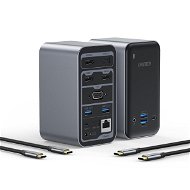
Reviews Choetech All-in-One Multifunction Docking Station Black
Interested in reviews of Choetech All-in-One Multifunction Docking Station Black? It got 3.4 out of 5 stars from our customers. Find specific customer reviews of Choetech All-in-One Multifunction Docking Station Black below. We will appreciate if you also share your experiences with Choetech All-in-One Multifunction Docking Station Black after purchasing.
User Reviews

Zuzana, Praha 9 - Prosek
Rated 03/02/2025, variant Choetech All-in-One Multifunction Docking Station Black
Verified purchase
after connecting 3 monitors via HDMI only 2 will work
after connecting 2 monitors via HDMI the sound stops working
the power supply is seriously weak, it is enough for a weak company notebook
0 ×Report
Automatic translation

Pavel, Pardubice
Rated 20/11/2024, variant Choetech All-in-One Multifunction Docking Station Black
Verified purchase
expandable area to 2x HDMI and 1x VGA

0 ×Report
Automatic translation
Customer, Chrást u Plzně
Rated 05/11/2024, variant Choetech All-in-One Multifunction Docking Station Black
Verified purchase
Very good docking station for both Mac and Windows
0 ×Report
Anonymous customer
Rated 28/09/2024, variant Choetech All-in-One Multifunction Docking Station Black
Verified purchase
I bought a MacBook Pro so I could connect two external monitors in expansion mode (different content). This dock, like all others on Alza, does not have DisplayLink. So the only way to connect two external monitors in expansion mode is to connect the dock via two USB-C cables. All other HDMI, VGA ports are useless, completely useless, because you only connect them in mirroring mode anyway (so you have the same content). In addition, the dock must be plugged into a power outlet at all times via a large power supply that is not used to charge the laptop. So you have to connect one cable to the dock to power the dock and the other cable to charge the laptop. Plus, the cord from the power supply is short, so you have to have outlets located under the table top, especially with a reclining table. A big disappointment, not recommended.
Lots of USB A ports if anyone still needs them
In order to have two external monitors as extended (different content), you need to connect the dock via two USB-C cables to the laptop
Multiple ports for external monitors, but all for mirroring (displaying the same content)
Need to power the dock from a power outlet
Does not use the power from the socket to charge the laptop
Only one USB-C
Does not have DisplayLink
0 ×Report
Automatic translation

Customer, Praha 8
Rated 03/04/2024, variant Choetech All-in-One Multifunction Docking Station Black
Verified purchase
It's working as it should.
Single-duct connection
They don't offer a laptop, but for this price it's ok
0 ×Report
Automatic translation
H-SMART s.r.o., Praha
Rated 30/08/2023, variant Choetech All-in-One Multifunction Docking Station Black
Verified purchase
You can read a very important warning in the manual: “. Only when USB-C (HOST①) is connected to the laptop HDMI① works, but other dock ports cannot work; Only when USB-C (HOST②) is connected to the laptop, all ports except HDMI① can work. “. Translated into English: - Either you're connected to the laptop via USB-C (HOST① top USB-C connector) and only the monitor via HDMI① will work and the other two HDMI ports don't work or - you're connected to the laptop via the bottom USB-C (HOST②) and then the bottom two HDMI ports work, but the top HDMI① doesn't. It follows: - you can't have three monitors on one NTB at the same time over three HDMIs - you can't have four monitors on one NTB at the same time - in any configuration it won't work for you unfortunately I ordered yesterday afternoon, I had it in the Alza box this morning - that's a great attitude from Alza of course. Unfortunately, I have to return the product because the four monitors declared on the advertising photo will not work on one NTB. Too bad!
not possible to connect 3 monitors to HDMI at the same time

0 ×Report
Automatic translation

Tomáš, Lestkov
Rated 30/05/2023, variant Choetech All-in-One Multifunction Docking Station Black
Verified purchase
Works well
0 ×Report
Automatic translation
AveTECH spol. s.r.o., Praha 9 - Horní Počernice
Rated 18/11/2021, variant Choetech All-in-One Multifunction Docking Station Black
Verified purchase
I almost don't turn on my nb without this, I recommend it, it's worth it
multifunctional and works as it should without installation
everything you need it has
appearance
quality of connectors including cabling
I would personally add USB A
I suppose it will scratch when carrying, but it's not made for carrying
both USB c connectors are required for complete function of all connectors
0 ×Report
Automatic translation

NATALIS, s.r.o., Žilina
Rated 31/10/2021, variant Choetech All-in-One Multifunction Docking Station Black
Verified purchase
the standard macbook connection via one usb-c cable does not work. you have to go through two. Through one the charging current flows, through the other the data for monitors
on mac you can't run two extended monitors via hdmi (although the picture shows this possibility). You can connect one, but you have to connect the other directly from the laptop via another reducer. Without this, only mirroring will work - it detects all connected monitors from the HUB as one.
0 ×Report
Automatic translation
