


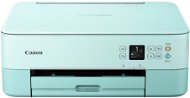
Reviews Canon PIXMA TS5353A Turquoise
Interested in reviews of Canon PIXMA TS5353A Turquoise? It got 4.4 out of 5 stars from our customers. Find specific customer reviews of Canon PIXMA TS5353A Turquoise below. We will appreciate if you also share your experiences with Canon PIXMA TS5353A Turquoise after purchasing.
User Reviews

Markéta, Praha
Rated 18/01/2024, variant Canon PIXMA TS5353A Turquoise
Verified purchase
Printer size
Colour design
Print quality
At first it takes a while to "wake up"
0 ×Report
Automatic translation

Ivan, KLADNO
Rated 01/11/2023, variant Canon PIXMA TS5353A Turquoise
Verified purchase - review from a price comparison website
Over time, there may be higher printing costs due to relatively more expensive replacement cartridges. Although of course it depends on the average print volume.
The turquoise color of the printer is just awesome to me. Quiet and high-quality printing and photos, pairing with a computer is easy, and the same can be said for setting up the printer for different print modes.
0 ×Report
Automatic translation

Customer, Praha 7 - Holešovice
Rated 08/09/2023, variant Canon PIXMA TS5353A Turquoise
Verified purchase
A great printer that has made my life easier! I print for teachers' needs and I am very satisfied. I'll probably try printing on photo paper soon, I haven't done that yet. I have only positive emotions from this purchase!: )
Print quality
Ease of installation
Easy to remove the paper if it gets stuck in the wind
Cheerful colour
Supports a variety of paper types
Relatively fast printing, sufficient for teacher needs
I don't have to get a subscription to print
First two inks included
Scans great
Sometimes when you have paper in both trays ( for example, multi-gram paper on top and low-gram paper on the bottom), it prints from the bottom tray even if you specify the top tray in the settings
When there is less ink, it does not stop printing completely after a warning, but starts printing with stripes - t. j. it is always better to check the colour level before printing
Sometimes it eats the paper and instead of reporting that the problem is with the paper, it says the problem is with the inks - so I bought a completely unnecessary black ink, even though there's still half of it left
0 ×Report
Automatic translation

Petr, Praha
Rated 05/07/2023, variant Canon PIXMA TS5353A Turquoise
Verified purchase - review from a price comparison website
Nice
Print quality
A problem with the two-sided printing setting
No usb cable included
0 ×Report
Automatic translation
