


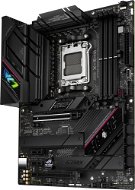
Reviews ASUS ROG STRIX B650E-F GAMING WIFI
Interested in reviews of ASUS ROG STRIX B650E-F GAMING WIFI? It got 4.7 out of 5 stars from our customers. Find specific customer reviews of ASUS ROG STRIX B650E-F GAMING WIFI below. We will appreciate if you also share your experiences with ASUS ROG STRIX B650E-F GAMING WIFI after purchasing.
User Reviews

Štefan, Chomutov
Rated 21/09/2024, variant ASUS ROG STRIX B650E-F GAMING WIFI
Verified purchase
From the memory of G. SKILL 32GB KIT DDR5 6000MHz CL30 Trident Z5 NEO RGB for AMD work oardne all expo
Works great
Price
0 ×Report
Automatic translation

Jaromír, Plzeň
Rated 14/09/2024, variant ASUS ROG STRIX B650E-F GAMING WIFI
Verified purchase
When I first turned on after installing the board, the black screen continued after about 15 minutes, the board's Q-LED reported a DRAM problem. Solved by updating BIOS to version 2024/08/07 via FlashBack. I use "Kingston FURY 64GB KIT DDR5 6000MHz CL36 Beast White EXPO" memory. There could also potentially be an issue with the Ryzen 9700X CPU, as there was a patch mentioned in that BIOS version for better stability with the Ryzen 9000 series.
Then Q-LED reported a problem with VGA (I have MSI GeForce RTX 4060 VENTUS 2X BLACK 8G OC graphics), "Load default" in BIOS helped.
Smooth operation
Ubuntu 24.04 OS start is 25 sec from PC power on, which is not bad
BIOS FlashBack
Problem with starting after installing the board. I don't know how much it was a board problem or a specific HW configuration.
0 ×Report
Automatic translation
Jaroslav, Chvalčov
Rated 10/09/2024, variant ASUS ROG STRIX B650E-F GAMING WIFI
Verified purchase
The board works as it should, I just had to update the BIOS because when using the Ryzen 7 9700x processor the temperatures were still high, reaching 95 degrees at peak. I replaced the radiator and the situation hasn't changed. Only after flashing the BIOS did it calm down. If you have a weak bluetooth signal, add the supplied wifi antenna.
Everything as it should be
0 ×Report
Automatic translation

Tomáš, Praha 5 - Stodůlky
Rated 07/09/2024, variant ASUS ROG STRIX B650E-F GAMING WIFI
Verified purchase - review from a price comparison website
After plugging it in, the mains power didn't work. Supposedly standard on ROG boards. It made installing Win 11 quite complicated. Even a BIOS update didn't help. I had to unplanned install Win10 where I could finish the installation offline and then from the other computer via USB to finish the drivers. Once the networking kicked in the rest was a piece of cake and the thorny road to Win 11 via Win 10 was complete. Next, the aforementioned PC booting problem. The worst was the uncertainty whether I had a handle on a faulty board. Except for the initial labour pains, the board is OK. But it's not 5*.
after plugging in, the power supply didn't work.
when I turn the PC on, it does nothing for exactly one minute. then the graphics come up and then everything is as it should be. I don't know what's causing it. but it scared me a lot.
0 ×Report
Automatic translation

Jan, Mnichovo Hradiště
Rated 31/08/2024, variant ASUS ROG STRIX B650E-F GAMING WIFI
Verified purchase - review from a price comparison website
High quality motherboard for Ryzen 7 7800X3D. That's all I have to say. Everything works, the GPU is easy to add and will be easy to remove in the future, Asus has such a quick switch on the lever. BIOS clear, its updates without problems at the first time, this board hasn't failed me with anything so far. Only time will tell the rest. Perhaps only the solution of the wifi antenna on two connectors and a cable seems less happy to me. The old PC had one connector on the board for wifi with a classic screwed antenna. I only used wifi marginally when the normal internet on cable was down and I went through the hotspot on my mobile. And one antenna on the back was enough. Here's a two-connector cable that has a magnetic folding abtena on it, which can be put in a better place. That sounds nice, but the cable is too short. About six feet tops. I have the box under my desk and the cable doesn't even make it comfortable to put on the monitor. So far I have slapped it on a magnet on the side of the box and in the future I will probably replace it with two classic antennas on the back, because the cable annoys me.
Functional, simple
I wasn't burned by anything during installation
GPU clamping
Clear BIOS
Short wifi antenna cable
0 ×Report
Automatic translation

Karel, Jeseník
Rated 23/08/2024, variant ASUS ROG STRIX B650E-F GAMING WIFI
Verified purchase - review from a price comparison website
price for quality
0 ×Report
Automatic translation

David, Lužany
Rated 23/08/2024, variant ASUS ROG STRIX B650E-F GAMING WIFI
Verified purchase - review from a price comparison website
Top board within the B650. Slow BOOT when using DDR 6000 solved by turning on memory contex. Now it boots for 10 si at EXPO.
Top board within the B650
Wifi
DDR 5 to 8000
Slow BOOT when using DDR 6000
0 ×Report
Automatic translation

Filip, Jamné u Jihlavy
Rated 21/08/2024, variant ASUS ROG STRIX B650E-F GAMING WIFI
Verified purchase
supr board for the price of 5499
it offers everything a player needs for 1440p, i. e. 4k
nothing
0 ×Report
Automatic translation

Customer, Příbram 1
Rated 09/05/2024, variant ASUS ROG STRIX B650E-F GAMING WIFI
Verified purchase - review from a price comparison website
asus soft
0 ×Report
Automatic translation
Anonymous customer
Rated 26/03/2024, variant ASUS ROG STRIX B650E-F GAMING WIFI
Verified purchase
From local reviews I was worried that the installation would be complicated but not so, the wiring was very simple
0 ×Report
Automatic translation
