


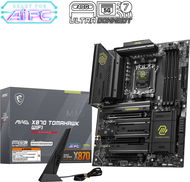
Reviews MSI MAG X870 TOMAHAWK WIFI
Interested in reviews of MSI MAG X870 TOMAHAWK WIFI? It got 4.6 out of 5 stars from our customers. Find specific customer reviews of MSI MAG X870 TOMAHAWK WIFI below. We will appreciate if you also share your experiences with MSI MAG X870 TOMAHAWK WIFI after purchasing.
User Reviews

Zdeněk, Nesovice
Rated 12/01/2025, variant MSI MAG X870 TOMAHAWK WIFI
Verified purchase - review from a price comparison website
The board works perfectly - I recommend it.
0 ×Report
Automatic translation

Matyáš, Jirny
Rated 27/12/2024, variant MSI MAG X870 TOMAHAWK WIFI
Verified purchase
I purchased the MSI MAG X870 Tomahawk motherboard and overall I can say that it is a solid product with quality workmanship and rich features at an affordable price. The board offers great performance and a lot of features that I may not even use. Installation was smooth, all connectors are easily accessible and the board has an intuitive layout. I also appreciate the robust cooling and wide compatibility with AMD processors. However, I ran into a problem with the BIOS not booting. When connecting two RAM modules, the board did not boot and displayed various errors. It took me quite a while to discover the cause. The temporary solution was to use only one RAM module, which allowed the BIOS to be updated. After the update, the board worked without problems even with two RAM modules. Although the process is relatively simple, it can be confusing and frustrating for less experienced users. I was also inspired to buy the MSI MAG X870 Tomahawk by the videos from Ator and Alza, where they shared their experiences from the excursion to MSI's production plant for this board.
I am absolutely impressed with the quality of workmanship and design
Stable performance after BIOS update
Reasonable price for the features
Need BIOS update for stable operation of two or more RAM modules

0 ×Report
Automatic translation

Filip, Brno
Rated 26/12/2024, variant MSI MAG X870 TOMAHAWK WIFI
Verified purchase
4 M.2 ports
5Gb/s LAN
Wi-Fi 7
cable for easy front panel connection
Windows 11 support
no coil whine when the PC is switched off (with ErP activated)
good temperatures
lovely design
digital debug LED with numeric codes
high quality and loud sound output
easy attachment and release of SSD and GPU
cannot activate hot plug for SATA ports
one M.2 port has only PCIe 4.0 x2 and the other shares PCIe 5.0 x4 with USB 40Gbps ports
0 ×Report
Automatic translation

Vojtěch, Vyšní Lhoty
Rated 29/11/2024, variant MSI MAG X870 TOMAHAWK WIFI
Verified purchase
I am very satisfied with the board. After a bios update it runs stably with 9800x3D at 5700MHZ and RAM at 8000MT/s. VRM temperatures are a little higher. For the price, it's a very good board.
No RGB: )
GK and SSD mounting
Debug display
5 Gbps LAN
0 ×Report
Automatic translation
Lukáš, Praha 5 - Jinonice
Rated 19/11/2024, variant MSI MAG X870 TOMAHAWK WIFI
Verified purchase
I'm currently using AI image and graphics calibration while playing and I can't help but wonder.
Ai functions on volume and picture
Automatic disk calibration
Beautiful bios design, finally I got a nicer one than some other brands
CPU stabilization with memory.
Price
0 ×Report
Automatic translation

Aleš, Prostějov
Rated 13/11/2024, variant MSI MAG X870 TOMAHAWK WIFI
Verified purchase
I chose this board because of ficuram ala not to pull out the GK because of the CMOS reset, Flash BIOS on the crank and especially the button on the GK, so I don't have to hunt the spejli like a lozja ala mechanism of summer 2000.
Pressure plate on GK
CMOS and Flash BIOS buttons on the back of the board
Attaching the ssd
Overall processing and temperatures
Consumption versus design
All 4 ssds do not have the same speed and share lines ( only two have full speed)
0 ×Report
Automatic translation

Tomáš, Karviná 4
Rated 03/11/2024, variant MSI MAG X870 TOMAHAWK WIFI
Verified purchase
quality workmanship
graphics card mounting
0 ×Report
Automatic translation
