


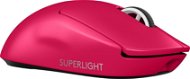
Bewertungen Logitech PRO X SUPERLIGHT 2, Magenta
Sind Sie interessiert an Bewertungen und Rezensionen zu Logitech PRO X SUPERLIGHT 2, Magenta? Zu 4,7 haben wir bisher eine Bewertung von 5 Sternen von 489 Benutzern. Unten auf dieser Seite finden Sie die spezifischen Erfahrungen anderer Kunden mit Logitech PRO X SUPERLIGHT 2, Magenta. Wir freuen uns jedoch, wenn Sie uns nach dem Kauf eine Punktzahl zu Logitech PRO X SUPERLIGHT 2, Magenta schreiben.
Benutzerbewertungen

Filip, Kolín
Bewertet am 30.12.2024, Variante Logitech PRO X SUPERLIGHT 2, schwarz
Verifizierter Kauf
Licht
schnell
Ausdauer
0 ×Melden
Automatische Übersetzung
Anonymer Kunde
Bewertet am 22.12.2024, Variante Logitech PRO X SUPERLIGHT 2, schwarz
Verifizierter Kauf
Ich habe eine superlight 1, ich habe auch eine g309. Superlight 2 liegt mir am besten in der Hand und ist etwas leichter als sl1. G309 ist auch keine schlechte Maus, obwohl batteriebetrieben und ca. 20g schwerer als sl2, aber sie passte mir einfach nicht in die Hand, sie hat so eine komische Form, ansonsten ist der Sensor, die Tasten und Griffe super, wer eine kleinere Hand hat, dem würde ich die G309 empfehlen.
Leicht wie eine Feder
8khz-Unterstützung in GHUB
Passt in die Hand
Sensor
Verwendbare Seitentasten
Solide Konstruktion
Wahrscheinlich nur das Scrollrad, da es eine leichtere Stufe hat, so dass es manchmal nur scrollt, ansonsten ist es großartig.
0 ×Melden
Automatische Übersetzung

Kunde, Praha9
Bewertet am 19.12.2024, Variante Logitech PRO X SUPERLIGHT 2, schwarz
Verifizierter Kauf - Bewertung über ein Vergleichsportal
100%
0 ×Melden
Automatische Übersetzung

Soňa, Praha 10
Bewertet am 29.11.2024, Variante Logitech PRO X SUPERLIGHT 2, schwarz
Verifizierter Kauf
Enkel lobt die Maus sehr
0 ×Melden
Automatische Übersetzung
Firma
Bewertet am 07.11.2024, Variante Logitech PRO X SUPERLIGHT 2, schwarz
Verifizierter Kauf
Alles gut
Der Aufprall auf die Mauer wird nicht von Dauer sein

0 ×Melden
Automatische Übersetzung
Anonymer Kunde
Bewertet am 29.10.2024, Variante Logitech PRO X SUPERLIGHT 2, schwarz
Verifizierter Kauf
Ideal für Valorant und andere Spiele
Leicht
8khz
Lange Akkulaufzeit
Ein bisschen teuer, aber es lohnt sich

0 ×Melden
Automatische Übersetzung
Martin, Zbýšov u Brna
Bewertet am 15.10.2024, Variante Logitech PRO X SUPERLIGHT 2, schwarz
Verifizierter Kauf
Ideale Form für kleinere Hände
Konnektivität
Bis zu 8k Hz - (CPU-intensiv)
Unglaubliche Akkulaufzeit
Schnellladung
Sehr geringes Gewicht
Logitech G-Hub App auf einen Blick
Geräuschvollere Tasten (aber nicht störend) - Wer diese Maus kauft, spielt sowieso mehr mit Kopfhörern
Einige mögen sagen, der Preis, aber bei knapp über 3k scheint es mir in Ordnung für alles, was diese Maus bietet.
0 ×Melden
Automatische Übersetzung
Jiří, Brandýs nad Labem-Stará Boleslav
Bewertet am 10.10.2024, Variante Logitech PRO X SUPERLIGHT 2, schwarz
Verifizierter Kauf - Bewertung über ein Vergleichsportal
Ich habe die Logitech G Pro X Superlight 2 als Ersatz für ihr Vorgängermodell ohne die 2 gekauft, nachdem sie in den Silikonhimmel gegangen war.
Ich bin dankbar für die Erhaltung des Designs und der Form, die für meine Handgröße und meinen Griff absolut ideal ist. Anfangs rutschten meine Finger traditionell auf der Oberfläche der Maus ab, aber selbst wenn ich die mitgelieferten Griffe nicht benutzte, ist der Griff nach ein paar Tagen Betrieb bereits absolut sicher und die Maus neigt nicht dazu, unter meinen Fingern wegzurutschen.
Superlight 2 ist endlich auf dem Markt mit einem USB-C-Anschluss angekommen, heureka! Allerdings werde ich Logitech hier nicht so sehr loben, denn ich hätte den gleichen Anschluss schon bei der älteren Schwester erwartet. Das mitgelieferte Kabel hat eine gummierte Oberfläche und ist recht steif. Es ist definitiv nichts, was ich beim Spielen (oder sogar bei der Arbeit am PC) an der Maus haben möchte, und es ist wirklich nur beim Aufladen nützlich.
Die beiden Haupttasten reagieren sicher und zuverlässig, im Vergleich zum Vorgängermodell war ich von einem etwas lauteren und "bissigeren" Klang der Haupttasten überrascht. Es ist definitiv kein störendes oder lästiges Geräusch, es ist nur anders als bei der ersten Generation Superlight. Die seitlichen Tasten befinden sich in bequemer Daumenreichweite. Das Rad ist abgestuft, leichtgängig und hat einen gummierten, gerändelten Rand.
Ich erinnere mich gerne an einige frühere Gaming-Mäuse von Logitech mit einer speziellen DPI-Schalttaste, aber die Superlight 2 verfügt leider nicht über eine solche. Glücklicherweise ist es für meine Bedürfnisse möglich, in der G HUB ein universelles Profil mit einer Empfindlichkeit zu erstellen, die sowohl für Spiele als auch für normale PC-Aktivitäten geeignet ist; bei Bedarf müsste man die DPI in der G HUB-Software umschalten.
Die werkseitig aufgeklebten Schlitten (wie bei jeder anderen Gaming- oder Nicht-Gaming-Maus) sind nicht besonders gut, und angesichts ihrer Dicke (oder eher Dünne) habe ich keinen Zweifel daran, dass sie sich sehr schnell abnutzen und sehr bald ersetzt werden müssen. Rezension innerhalb einer Rezension - Ich habe die Glas-Superglide auf der vorherigen Generation und werde sie auch auf dem Superlight 2 bestellen, sie sind absolut perfekt für die Kunststoffunterlage und ich bin absolut zufrieden mit ihnen.
In Logitech G HUB hatte ich alles, was ich brauchte, in wenigen Minuten eingerichtet, und ich war froh, einige der neuen Funktionen nutzen zu können (Sensorkalibrierung, Einstellung des Abhebeabstands von der Pad-Oberfläche, Energiesparoptionen). Als traditionellen Bonus können Sie die Einstellungen auch im internen Speicher der Maus speichern.
Die Ausdauer in der Kategorie der Gaming-Mäuse sieht bisher beeindruckend aus. Die vorherige Generation war schon mehr als gut, und Superlight 2 geht noch einen Schritt weiter.
Meine Eindrücke vom Spielen mit der Superlight 2 sind praktisch identisch mit denen der vorherigen Mausgeneration - angenehm und völlig nahtlos. Das wird nur durch die bereits erwähnten Gleiter (für die es eine sehr einfache Lösung gibt) ein wenig getrübt, so dass dies eines der zwei (und ein halbes) Dinge ist, die ich der Maus vorwerfen würde. Der zweite ist natürlich der Preis, allerdings war ich damit schon im Vorfeld versöhnt und es kann nicht gesagt werden, dass er nicht der Qualität des Produktes entsprechen würde und die Hälfte gehört dem Kabel, das natürlich beim Spielen nicht angeschlossen werden muss.
Unterm Strich bin ich mit der Logitech PRO X SUPERLIGHT 2 sehr zufrieden und kann sie allen FPS-Spielern (nicht nur) empfehlen.
Logitech HERO 2 Präzisionssensor
Design, Form und Größe, Qualität der Verarbeitung
Ausdauer
Geringes Gewicht
Logitech G HUB und Einrichtungsoptionen
Ohne RGB-Serepetten
Option zum Speichern des Profils im internen Speicher der Maus
Das hieße, den tschechischen Kunden den Preis schmackhaft zu machen und ihn nicht als Nachteil zu erwähnen: )
Werkseitig aufgeklebte Gleiter (wie bei jeder anderen Maus)
Stabiles, gummiertes Ladekabel
0 ×Melden
Automatische Übersetzung

Filip, Podlešín
Bewertet am 24.09.2024, Variante Logitech PRO X SUPERLIGHT 2, schwarz
Verifizierter Kauf
mausetauglich
Dumm
0 ×Melden
Automatische Übersetzung
Anonymer Kunde
Bewertet am 15.09.2024, Variante Logitech PRO X SUPERLIGHT 2, schwarz
Verifizierter Kauf
Ich würde so eine Maus niemandem empfehlen, entweder habe ich Pech oder Logitech hat angefangen zu sparen und zu betrügen (oder sie schicken einfach defekte Teile nach Tschechien - nicht nur bei Mäusen)
Leichte Maus
Langes Festhalten
Ich weiß nicht, ob ich ein defektes Teil habe, die Reklamation wurde nicht anerkannt.
Die ersten paar Monate super, später beim Laden des Betriebssystems funktioniert die Maus nicht mehr, man muss den Empfänger ausstecken. .
Ab und zu fängt die Maus an zu hacken - zu überspringen. Auch hier gilt: Einfach den Stecker ziehen und es funktioniert wieder normal.
Die erwähnten Probleme sind zufällig, ich kann sie nicht verursachen, also reichen sie nicht für eine Beschwerde aus: (. Für diese Art von Geld würde ich eine Spitzenmaus erwarten und nicht diese.
0 ×Melden
Automatische Übersetzung
