


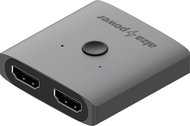
Reviews AlzaPower 2in1 Bi-Directional HDMI 4K/60Hz Switch grey
Interested in reviews of AlzaPower 2in1 Bi-Directional HDMI 4K/60Hz Switch grey? It got 4.4 out of 5 stars from our customers. Find specific customer reviews of AlzaPower 2in1 Bi-Directional HDMI 4K/60Hz Switch grey below. We will appreciate if you also share your experiences with AlzaPower 2in1 Bi-Directional HDMI 4K/60Hz Switch grey after purchasing.
User Reviews

Michal, Kostomlaty pod Řípem 
Rated 08/10/2026, variant AlzaPower 2in1 Bi-Directional HDMI 4K/60Hz Switch grey
Verified purchase - review from a price comparison website
Good workmanship
Works without problems
0 ×Report
Automatic translation

Pavel, Litomyšl
Rated 12/09/2026, variant AlzaPower 2in1 Bi-Directional HDMI 4K/60Hz Switch grey
Verified purchase - review from a price comparison website
It's a switch between screens - it doesn't duplicate to both outputs. (but maybe it was described that way in the description)
0 ×Report
Automatic translation
Bohumil, Albrechtičky
Rated 01/09/2026, variant AlzaPower 2in1 Bi-Directional HDMI 4K/60Hz Switch grey
Verified purchase
fajne, jen mi občas vypadaval obraz, asi bych to nechtěl na dlouhodobé používání
0 ×Report

Jiří, Slopné
Rated 24/07/2026, variant AlzaPower 2in1 Bi-Directional HDMI 4K/60Hz Switch grey
Verified purchase - review from a price comparison website
Awesome works
0 ×Report
Automatic translation
Tomáš, Šternberk 1
Rated 17/06/2026, variant AlzaPower 2in1 Bi-Directional HDMI 4K/60Hz Switch grey
Verified purchase
I’ve got my PC and PS5 connected to a single monitor, and it works brilliantly. Even when one device is completely switched off. It is therefore not the case that it must be in standby mode at the very least. It’s easy to switch between them. Total satisfaction.
Really functional
Attractive metal design
A subtle LED
Easy switching
0 ×Report
Automatic translation
Company
Rated 15/06/2026, variant AlzaPower 2in1 Bi-Directional HDMI 4K/60Hz Switch grey
Verified purchase
I'll have to try a different product and return this one
Unfortunately, it didn’t work as it should have – it kept switching power sources, and it wouldn’t connect to the Mac at all; it handled the PlayStation better
0 ×Report
Automatic translation

David, Česká Kamenice
Rated 12/06/2026, variant AlzaPower 2in1 Bi-Directional HDMI 4K/60Hz Switch grey
Verified purchase
It might be OK for FHD, but it’s unusable for 4K
It flickers in 4K. at first, about once every 20 minutes; after the second hour of work, as often as every 5 minutes
0 ×Report
Automatic translation

Ladislav, Dolní Dunajovice
Rated 10/06/2026, variant AlzaPower 2in1 Bi-Directional HDMI 4K/60Hz Switch grey
Verified purchase - review from a price comparison website
Very satisfied with the APW-ADHD2HD01Y 2-in-1 HDMI adapter. OK."
0 ×Report
Automatic translation
Anonymous customer
Rated 31/05/2026, variant AlzaPower 2in1 Bi-Directional HDMI 4K/60Hz Switch grey
Verified purchase
It works
it's a good gadget
0 ×Report
Automatic translation

Milan, Bukovinka
Rated 15/04/2026, variant AlzaPower 2in1 Bi-Directional HDMI 4K/60Hz Switch grey
Verified purchase - review from a price comparison website
Works as it should, no problems.
0 ×Report
Automatic translation
